Settings desk · room systems
Google Meet hardware room audio: noise cancellation, TrueVoice and admin defaults
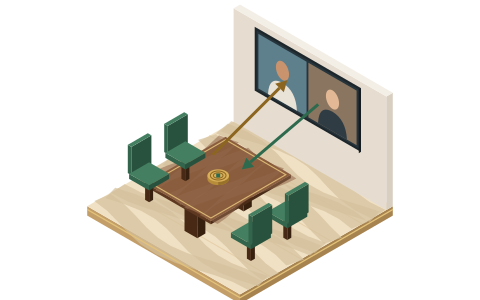
A Google Meet room has two possible noise filters, depending on the kit in it: Meet's own noise cancellation, and TrueVoice on Series One systems. Each has its own switch on the touch controller, admins can preset one of them per device, and a change made during a meeting quietly expires when that meeting ends. Here is which switch does what, and when it takes effect.
Scope, minuted
This page is about Google Meet hardware: the room kits, touch controllers and Series One systems that live in meeting rooms. The Meet app on your own laptop or phone has separate settings and isn't covered here. Buying kit is outside our lane; we deal with how the equipment already on the wall can be configured.
Two systems: Meet noise cancellation vs Series One TrueVoice
Google's help page for Meet hardware describes noise cancellation as software that removes background noises "such as typing, closing a door, or the sounds of a nearby construction site". Its limits are written just as plainly: it filters out sounds that don't sound like voices, so voices from a TV or several people talking at once are not removed, and audio from screen sharing isn't affected at all.
Series One kits work differently. Google says they ship with TrueVoice, its own denoising that "emphasizes human voices and suppresses background noise", and it has a separate switch. When Google brought software noise cancellation to room kits in March 2022, its launch post listed Logitech and ASUS room kits and Chromebase for meetings, and stated that Series One compute systems would rely on TrueVoice alone, which needs a Series One Smart Audio Bar or Mic Pod.
| Kit in the room | Denoiser | Where a user switches it | Admin default? |
|---|---|---|---|
| Meet hardware room kits (the 2022 post named Logitech, ASUS and Chromebase) | Meet noise cancellation | Touch controller: Settings → Audio → Noise cancellation | Yes, per device, in the Admin console |
| Series One systems | TrueVoice | Touch controller: Settings → Audio → Smart Audio Bar settings → TrueVoice noise cancellation | Not described on the current admin page |
| Poly devices | Poly's own | Google's help sends you to Poly Studio support | Not covered by Google's page |
Two notes on that table. The admin column is what Google's admin page documents today; the 2022 post said the admin setting would not change Series One behaviour at launch and promised a later update, and the current admin article doesn't mention Series One at all. So for a Series One room, treat the touch controller as the source of truth and check it in person.
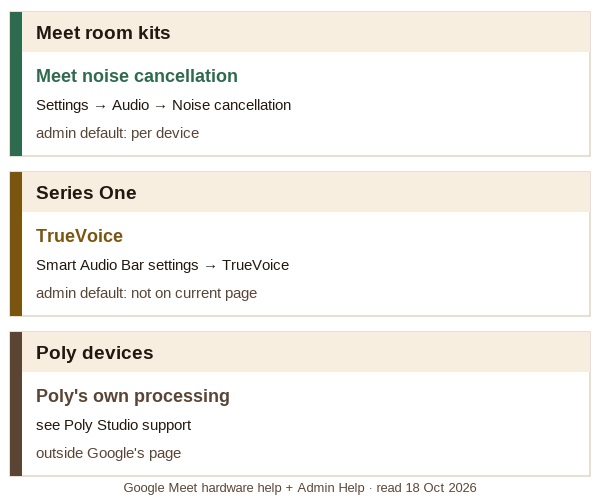
From Google's Meet hardware help, Admin Help and the March 2022 Workspace Updates post, read 18 October 2026.
Setting it on the touch controller
- Open Settings, then Audio, on the room's touch controller.
- Room kit: turn Noise cancellation on or off. Series One: under Smart Audio Bar settings, turn TrueVoice noise cancellation on or off.
- Mind the timing. Google says a change made during a meeting applies only to that meeting, and a change made outside a meeting applies only to the next one.
That third step explains a complaint we hear in different words every month: "we turned it off for the music lesson, and the next day it was back on." It was supposed to be. A controller change is a one-meeting decision; a lasting default is an admin decision.
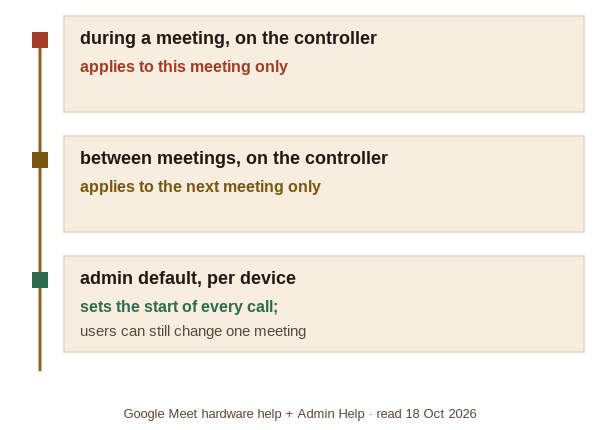
Timing rules from Google's Meet hardware help and Admin Help, read 18 October 2026.
Admin defaults: per device, and dated
Google Workspace Admin Help (the page shows a last update of 13 October 2026) describes one control: whether noise cancellation is on at the beginning of each call. The path is Admin console → Devices → Google Meet hardware → Devices, then pick a device, open Device settings, edit Noise cancellation and tick or untick "Noise cancellation is on at the beginning of each call". You can filter the device list by organisational unit first, and Google notes that some actions need the Manage devices privilege for Meet hardware.
The article documents this per device, not as a fleet-wide switch, and it says users can still change the setting for an individual meeting. For a building full of rooms that should behave the same way, that means a short checklist per room, and the dated settings note this site recommends for every room system. Estate-wide rollout belongs to IT deployment planning; this page stops at the room.
Edition defaults that surprise schools
Both Google pages agree on the headline: noise cancellation is on by default for most Google Workspace editions and off by default for Education Plus, plus the Teaching and Learning add-on (the user help calls it the Teaching and Learning Upgrade). A school that bought rooms expecting the same behaviour as an office will find the filter off until someone changes it, which may be exactly right for music rooms and wrong for lecture halls next to a corridor.
The admin page lists the editions that support the admin default today: Business Standard or Plus, Enterprise Standard or Plus, Education Plus, and Enterprise Essentials or Essentials Plus. If yours isn't on that list, check Google's edition comparison before assuming the control exists.
Echo in Meet rooms: the usual cause
Noise cancellation doesn't fix echo, and Google is explicit that it leaves voices alone. The common source of echo in a Meet room is a second audio path: someone in the room joined from a laptop with full audio while the room kit was already carrying the call. The room-safe way to bring a laptop is Meet's Companion mode, which joins with the laptop's mic and meeting audio switched off; our Join Map covers the decision for every kind of room.
Series One rooms have one more room-level tool: the Smart Audio Bar can be calibrated to the room's acoustics from the touch controller. Google says calibration can't be done during a meeting, and that a bar moved to a different room should have its old calibration reset and be calibrated again. It is a setting, not a construction project, and it belongs on the checklist after any furniture move.
Asked at the controller
How do I turn off noise cancellation on Google Meet hardware?
On the touch controller, open Settings, then Audio, and switch Noise cancellation off. On Series One, switch off TrueVoice noise cancellation under Smart Audio Bar settings.
Why did noise cancellation turn itself back on?
Google applies a controller change made during a meeting to that meeting only, and one made between meetings to the next meeting only. A lasting default is set per device in the Admin console.
What is TrueVoice on Series One?
Google's denoising for Series One kits, which emphasises voices and suppresses background noise. It has its own switch under Smart Audio Bar settings on the touch controller.
Is Meet hardware noise cancellation on by default?
For most Google Workspace editions, yes. Google lists it as off by default for Education Plus and the Teaching and Learning add-on.
Will noise cancellation stop echo in a Meet room?
No. It removes non-voice noise. Echo usually comes from a laptop in the room joined with audio; use Companion mode for laptops instead.
Verification note: "Filter out noise from your video meetings on Meet Hardware" (support.google.com/meethardware/answer/10225387), "Turn noise cancellation on or off by default" (Admin Help, page dated 13 October 2026), "Calibrate your Series One Smart Audio Bar", and the Workspace Updates post of 15 March 2022 were read on 18 October 2026, along with krisp.ai/pricing.