The umbrella guide
Hybrid meeting audio: two directions, one fix order
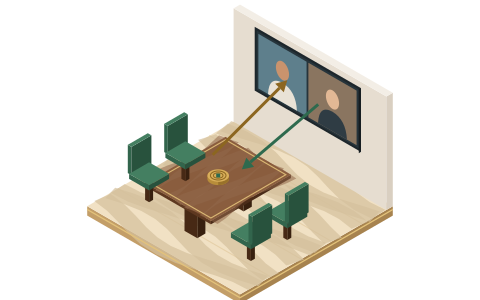
Hybrid meeting audio fails in two directions, and they have different causes. Room-to-remote failures — echo, thin far-end voices, chopped words — are mostly layout and settings. Remote-to-room failures — the table talking over the screen, remote voices nobody quite catches — are mostly volume and chairing. Mixing the two up is why so many "fixes" don't take. This page is the map.
Room → remote
mostly layout and settings
- Echo
- The half-heard table
- Processing eating voices
Remote → room
mostly volume and chairing
- The talk-over
- Delay collisions
- Remote-side noise
Direction one: the room, as heard by remote people
Remote participants experience your room as one audio stream, produced by whichever device carries the room's microphone. Everything that goes wrong in this direction goes wrong inside the room:
- Echo. A mic in the room is hearing a speaker in the room — either because several laptops joined with live audio, or because one device's echo cancellation lost the plot. This is the most common failure in shared rooms and it has a page of its own: conference room echo. The short version: a room gets exactly one open audio path, and extra devices must disconnect audio, not mute, because a muted laptop's speaker still feeds the room mic.
- The half-heard table. People near the mic sound fine; the far end of the table arrives faint or clipped. Distance is physics, but before any purchasing conversation there are settings and seating moves that recover real ground — mic selection on the room system, suppression strength, and putting your frequent speakers inside the pickup radius. Worked through in remote can't hear the room.
- Processing eating voices. Noise suppression is trained to keep speech and drop everything else, and modern room systems run it by default — Teams Rooms on Windows applies Microsoft's noise suppression out of the box, and Zoom Rooms runs a base processing layer you can't switch off, with a Noise Suppression control on top (Off / Auto / High). Set to their aggressive modes in a quiet room, these layers can start shaving quiet, distant or overlapping speech. If remote people report words "cutting out" rather than being faint, suspect suppression before the microphone.
Direction two: remote people, as heard by the room
The reverse direction fails differently. Remote voices arrive through one speaker, at one volume, with none of the social weight of a body at the table:
- The talk-over. The room hears itself at natural volume and the remote person through a speaker, so the table interrupts without meaning to. Some of this is audio (speaker volume set too low to compete), most of it is chairing. We wrote about the underlying asymmetry in why the room always blames the remote folks.
- Delay collisions. Every hybrid call carries latency; the room and the remote side keep starting sentences at the same moment and both backing off. No setting removes latency — but a chair who explicitly hands the floor ("Priya, then the room") removes the collisions, free of charge.
- Remote-side noise. A remote participant in a café can flood a whole room, because the room's speaker plays them at meeting volume. Platforms suppress much of this by default now; a remote attendee who runs a cleanup layer on their own machine solves the rest at the source. That's their desk setup, not your room — we stay on the room side of that line on this site.
The fix order
When a hybrid room sounds wrong and you don't yet know why, work this order. Only one step costs money, and each step makes the next one diagnosable:
- Join layout. One open audio path per room — the anchor. Decide which device that is with the Join Map, and get every other device to join with audio disconnected. Until this is true, no other diagnosis is trustworthy, because every symptom might just be the loop.
- Room-system settings. Tell the room software what kind of room it lives in — once, deliberately. Our walkthroughs for Zoom Rooms and Teams Rooms cover what each control does, what the defaults already handle, and what to leave alone.
- Seating. Free, unglamorous, effective: put the people who talk most where the microphone already listens best, and stop seating the quiet ones by the door. If one laptop anchors the whole room, this matters double — see one laptop, whole room.
- Cleanup software on the anchor. When the anchor is a laptop, a processing layer like Krisp adds a second opinion between mic and meeting app — it states it removes noise, echo and cross-talk, and works at the audio level with any conferencing app. What it can and can't do for a shared room is written up honestly in Krisp for conference rooms.
- Chairing habits. Hand the floor explicitly, repeat questions from the table into the mic, and run the sixty-second room check before recurring meetings. Habits hold fixes in place; menus don't attend the meeting.
Symptom index
| What people say | Direction | Likeliest cause | Start here |
|---|---|---|---|
| "I'm hearing myself back" | Room → remote | Two open audio paths in the room | Conference room echo |
| "The room sounds underwater / far away" | Room → remote | Wrong mic selected, or speakers out of pickup range | Remote can't hear the room |
| "Words keep cutting out mid-sentence" | Room → remote | Suppression set too aggressively for a quiet room | Zoom Rooms / Teams Rooms settings |
| "We can never get a word in" | Remote → room | Latency collisions plus no floor-handling | Fix order, step 5 |
| "Someone's typing is deafening" | Either | Unprocessed mic close to a keyboard | Krisp for conference rooms |
| "It was fine last week" | Either | Somebody changed a controller setting mid-meeting | Settings pages; then write the setting down |
The honest boundary
Layout, settings, seating, software, chairing — that's our whole toolkit, and it fixes most rooms. What it doesn't fix: reverberant glass boxes, genuinely broken devices, rooms too big for their one microphone. Those are physical problems with physical answers, and pretending otherwise would waste your Tuesday. When you hit that boundary, we say so on the page you're reading rather than upselling you sideways. That policy, and how the affiliate links here work, is in the fine print.
Verification note: Zoom Rooms' noise-suppression options and always-on base processing, and Teams Rooms' default noise suppression on Windows, were re-read on the vendors' documentation on 20 September 2026.