Diagnosis · room to room
Two rooms, one meeting: finding which room is causing the echo
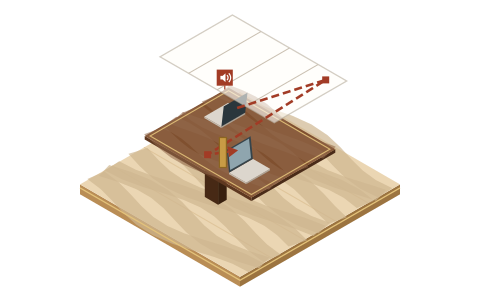
When two meeting rooms join the same call and one of them hears its own voices coming back, the instinct is to fix the room you are sitting in. Usually that is the wrong room. Echo is your sound being sent back to you by someone else's equipment, so the room that suffers is rarely the room that causes it. Here is a three-minute test to find the guilty room, and the short list of things to check once you know.
Scope, minuted
This page is about meetings where two or more rooms join one call, each with its own room system or anchor laptop, often with remote people as well. Single-room echo has its own triage on the conference room echo page; this one is about telling rooms apart.
The rule that saves the most time: the echo is made elsewhere
Zoom's echo article puts the principle in one line: generally, if you are hearing echo, some device is channelling your audio back to you. In a two-room meeting that device is almost always in the other room. Room A speaks; Room B's speaker plays it; Room B's microphone picks it up again and, if B's echo cancellation doesn't remove it, sends it back to A a moment later. Room A hears itself. Room B, meanwhile, may hear a perfectly clean meeting and have no idea anything is wrong.
So the first question is not "what is wrong with our room?" but "who hears the echo?". If only Room A hears it, look at Room B. If every remote participant hears it whenever Room B is unmuted, Room B is the source. If both rooms hear themselves, both rooms have a fault, and you fix them one at a time.
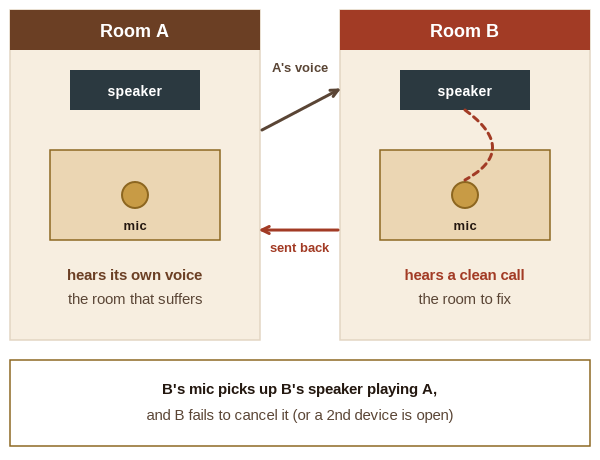
The loop as Zoom's echo article describes it, drawn for two rooms; vendor pages read 18 October 2026.
The three-minute test
Zoom's own isolation advice is a muting sweep: silence people individually, or silence the whole call and bring voices back singly. With rooms, do it by room. Every platform's host controls can mute a participant, and a room system appears as one participant.
- Mute every room and every remote person except the room that hears the echo, which keeps talking.
- Unmute one other room. Talk for ten seconds in the room that hears the echo. If the echo returns, the room you just unmuted is sending it back.
- Mute it again and try the next room, then each remote person, until you have the source. Write the room's name down; it will matter next week.
One warning from the same Zoom article: when the cause is several devices with live audio in one room, muting is not a cure, because a muted laptop still plays the meeting through its speaker. The test finds the room; disconnecting the extra device's audio fixes it.
What to check in the guilty room
Zoom lists the causes plainly: computer and telephone audio active together, speakers too close to each other, and several computers with active audio in one conference room, plus speakers such as a TV or soundbar turned up too loud, echo cancellation that has failed because of a device or performance problem, and a faulty microphone. In a room that is part of a multi-room call, work down them in this order.
| Check in the guilty room | What you're looking for | Fix |
|---|---|---|
| Second audio path | A laptop or phone in the room joined with audio, beside the room system | Disconnect its audio; use the platform's companion or room-audio option |
| Phone plus computer | Someone dialled in by phone while their laptop also has computer audio | Leave computer audio on the laptop, or hang up the phone |
| Loud playback | A TV or soundbar playing the call well above speech level | Bring it down to conversation level and retest |
| Echo cancellation | The room system's canceller not removing what its speaker plays | Restart the room system; in DSP rooms, call whoever installed the audio |
| Microphone | A damaged or wrongly selected room microphone | Check the selected input on the room controller |
The first row is the commonest by far, and the most preventable. Our Join Map covers the rule (one audio path per room, everyone else silent), and each room platform has its own way of enforcing it, compared in our Zoom Rooms and Teams Rooms guides.
Echo cancellation: which room system does what
If the guilty room has no second device and sensible volume, its echo cancellation is next. Who handles it depends on the system:
- Teams Rooms on Windows. Microsoft's operations page says that when a certified digital signal processor is connected, Microsoft switches off its service-side echo cancellation and relies on the DSP. In an integrator-built room, echo is therefore a DSP configuration question, not a Teams setting.
- Teams Rooms on Android. Microsoft states that audio processing there is handled by the device maker's firmware, so the OEM's documentation is the reference.
- Cisco RoomOS devices. Cisco's Music mode article notes the device keeps its echo cancellation running even in Music mode, so switching modes won't create echo; a room left in Music mode only sounds livelier.
- Google Meet hardware. Its noise cancellation removes non-speech sound and, by Google's own description, leaves voices alone, so it can't scrub an echoed voice. Look for the second audio path first.
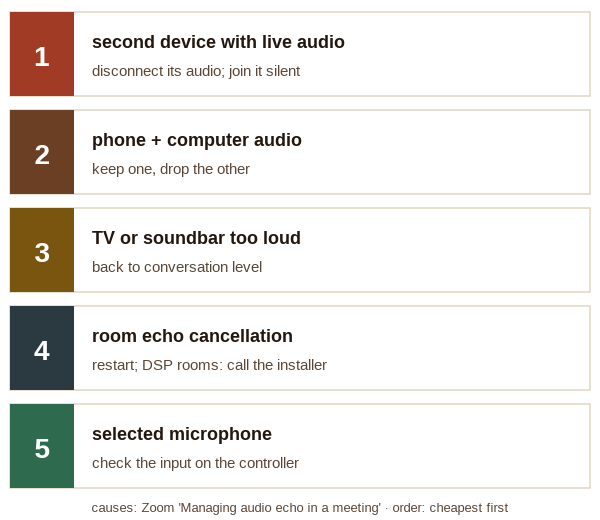
Causes from Zoom's "Managing audio echo in a meeting"; the order is MidTable's, cheapest check first. Read 18 October 2026.
When both rooms hear themselves
Then both rooms are sending the other's audio back, and the muting test will show it: the echo returns whichever room you unmute. Fix the room with an obvious second device first, retest, then move on. Two rooms that are physically close (adjoining rooms, or a glass wall) can also hear each other through the air, which no setting will fix; we mention it so you can rule it out, and leave the building work to others.
Make the next multi-room meeting boring
Most room-to-room echo is designed out before the meeting starts. Name one anchor per room in the invite, ask laptops in each room to join silent, and keep room speakers at conversation level. If a room is new to the meeting series, run the sixty-second room check there before the start time, not during it.
Asked across two tables
We hear an echo, but the other room says they hear nothing. Who's at fault?
Almost certainly the other room. Echo is your audio being sent back by someone else's equipment, so the room that causes it often hears a clean meeting.
How do I find which room is causing echo in a meeting?
Mute every room but yours, then unmute the others one at a time while you talk. The room that brings the echo back when unmuted is the source.
Will muting the guilty room fix it?
Only while it stays muted. If the cause is a second device in that room, disconnect that device's audio; a muted laptop still plays the meeting through its speaker.
Our boardroom has an installed DSP and the other office hears echo. Which setting fixes it?
On Teams Rooms for Windows, Microsoft hands echo cancellation to a connected certified DSP, so the fix is in the DSP's configuration. Call whoever installed the room's audio.
Should both rooms have one anchor each?
Yes. The rule is one audio path per room, so two rooms mean two anchors, with every other device in each room joined without audio.
Verification note: Zoom "Managing audio echo in a meeting", Microsoft Learn "Microsoft Teams Rooms maintenance and operations", Google's Meet hardware noise-cancellation help and Cisco's Music mode article were read on 18 October 2026, as was krisp.ai/pricing.